SAP CITS: Automated iFlow Documentation for SAP Integration Teams
SAP CITS - Cloud Integration Technical Specification, created by community developer 'rhviana', automates documentation for SAP Cloud Integration projects and reduces manual drafting time. The extension captures iFlow metadata from the Integration Suite and converts active configurations into formatted Microsoft Word documents while surfacing configuration identifiers and package details. It targets integration developers, solution architects and consultants who need reproducible technical specifications and clearer handovers for audits and operations.
What the tool does for documentation workflows
The extension extracts configuration metadata directly from an open iFlow and assembles that information into a fully formatted Microsoft Word document, removing repetitive copy‑and‑paste steps. It captures iFlow names, IDs and package details, creating a consistent starting specification that project teams can edit into delivery artifacts or audit records. The single-action approach reduces manual transcription of technical metadata.
How it handles sensitive integration data locally
All processing occurs inside the browser, following a zero-server architecture that keeps extraction and rendering local to the user's machine. The extension does not send integration contents to external servers, a design choice that limits exposure of enterprise metadata. It is implemented for Chrome using Manifest V3, aligning with current extension security standards.
How it integrates into the SAP iFlow designer workflow
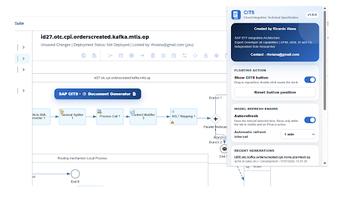
The extension injects a draggable floating action widget into the iFlow designer so developers can trigger extraction without leaving the designer page. Clicking the widget runs the extraction routine against the active designer DOM and produces the technical output in one interaction. For visual context the tool includes a dependency-free HTML5 Canvas module that draws sender-to-receiver architecture diagrams and embeds them into the generated document.
Whether it documents mappings, scripts and security references
The tool collects granular technical details from message mappings and content modifiers and builds inventories of used resources. It extracts headers, properties and source/target fields, and lists referenced items such as:
- Groovy scripts
- XSLT files
- XML schemas
It also compiles a security summary that records credential aliases and certificate references so teams can track reusable components across integration landscapes.
Who should adopt this community tool and why
Given its community-driven origin and positive standing among SAP practitioners, the extension suits integration teams that accept community-maintained utilities and can validate outputs internally. Organizations that require vendor-level support or formal service agreements should consider that this is an independent tool created by a community contributor rather than an official vendor product.